For most small businesses shipping standard 4×6 parcels, I’d start with the Rollo Wireless Shipping Label Printer for its Wi-Fi setup, while the Rollo USB is a simpler wired alternative and the Brother QL-800 suits businesses that need smaller labels or black-and-red printing. The main tradeoff is between straightforward parcel-label printing and broader label flexibility: wireless and Bluetooth models can simplify placement, while USB models avoid dependence on a wireless setup. A separate question is whether you need only shipping labels or also product, address, barcode, and other business labels. I compare all 12 options by workflow fit, connection, supported label use, and setup demands below. Continue reading for the full breakdown and buying advice.

Get business pricing on office and shipping supplies
- Business-only prices and quantity discounts
- Tax-exempt purchasing
- Multiple users, one account, clear invoices
Key Takeaways
- Rollo Wireless and Rollo USB fill different workflow needs: the wireless model is the clear fit when printer placement and Wi-Fi matter, while the USB model suits a fixed workstation and wired setup.
- Brother QL-800 stands apart from the 4×6 shipping group: its black-and-red thermal printing and smaller-label focus make it more useful for varied office labeling than for a shipping-only workflow.
- Wireless does not mean the same thing across this lineup: Rollo Wireless, Bluetooth models, and the Wi-Fi Brother PT-D800W use different connection approaches, so buyers should check device compatibility before choosing.
- Built-in label handling is a practical differentiator: the Omezizy includes a label bin, which may suit a tidier work surface, while compact options without one may need more room for a label roll.
- Several models are aimed at basic 4×6 parcel labels, not broad label production: Westinghouse, HP, Arkscan, and other shipping-focused picks should be compared by computer and mobile support, rather than by the shared label size alone.




| commercial label printer | Connectivity | Printer type | Dimensions | Weight |
|---|---|---|---|---|
| Westinghouse Thermal Shipping | Ethernet, USB | Thermal | 9.45 × 8.36 × 6.88 inches | — |
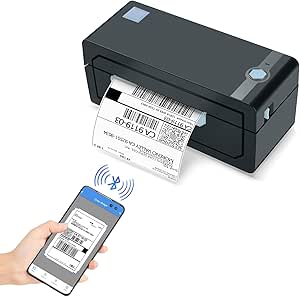
| Rollo Wireless Shipping Label | USB, Wi-Fi | Thermal | — | 3.5 pounds |
| Thermal Shipping Label Printer | Bluetooth, USB | Thermal | 8.08 × 4.73 × 6.9 inches | 3 pounds |
| JADENS Bluetooth Thermal Shipp | Bluetooth, USB 2.0 | Thermal | 5.91 × 9.06 × 5.91 inches | — |
| Brother QL-800 High-Speed Prof | USB | Thermal | — | — |
| HP Shipping Label Printer | USB 2.0 | Direct thermal | 8.2 × 7.29 × 6.63 inches | 1,340 g |
| Omezizy Bluetooth Shipping Lab | Bluetooth and USB | Thermal | 7.3 × 6.3 × 5.35 inches | 0.97 kg |
| Westinghouse USB Shipping Labe | USB | Direct thermal | 4 × 8 × 4 inches | 3 pounds |
| KNAON Bluetooth Thermal Shippi | Bluetooth and USB 2.0 | Thermal | 5.46 × 3.03 × 2.61 inches | 2.8 pounds |
| Brother P-touch PT-D800W Comme | Wi-Fi; compatible with PC and smartphones | Thermal | 13.27 × 7.5 × 6.8 inches | 7.8 pounds |
| Rollo USB Shipping Label Print | USB | Thermal | 4 x 8 x 4 inches | 2.2 pounds |
| Arkscan 2054A Shipping Label P | USB cable | — | 9.25 x 8.25 x 6.25 inches | — |
More Details on Our Top Picks
Westinghouse Thermal Shipping Label Printer USB, 4×6 Label, Commercial Grade, Compatible with USPS, UPS, FedEx, Shopify, Amazon, Small Business, Desktop Label Printer for Packages, Includes Labels
The Westinghouse makes the most sense for a small shipping station where fast 4×6 output matters more than phone-based printing. Its stated speed of 6 inches per second can help keep a packed order queue moving, while direct thermal printing avoids ink and ribbons. Ethernet and USB give it useful wired options, and the included starter labels help a new operation get going. Compared with the Rollo Wireless, it trades Wi-Fi and AirPrint convenience for a wired setup; compared with the Brother QL-800, it handles wider shipping labels but lacks that model’s red-and-black printing. The tradeoffs are real: Bluetooth is absent, cables are sold separately, and the supplied details do not establish how well it holds up to heavy daily workloads.
Pros:- Prints at a stated 6 inches per second for brisk shipping-label batches
- Supports both Ethernet and USB connections
- Direct thermal operation avoids ink and ribbon purchases
- Starter labels and accessories are included
Cons:- No Bluetooth or Wi-Fi connectivity is listed
- Ethernet and USB-C cables are sold separately
- Durability for heavy daily use is not specified
Best for: Small ecommerce sellers with a fixed packing desk who print batches of standard 4×6 carrier labels from a computer or wired network.
Not ideal for: Sellers who need phone-first Bluetooth printing or documented durability for sustained, high-volume warehouse shifts.
- Printer type:Thermal
- Maximum media size:4 × 6 inches
- Print speed:6 inches per second
- Print resolution:203 × 203 DPI
- Connectivity:Ethernet, USB
- Media width:0.78–4.6 inches
- Dimensions:9.45 × 8.36 × 6.88 inches
- Warranty:Limited warranty
Our verdict“Choose this Westinghouse for speedy, wired 4×6 shipping at a fixed workstation, but pick the Rollo Wireless if printing from phones over Wi-Fi matters more.”
Rollo Wireless Shipping Label Printer – Wi-Fi 4×6 Thermal Label Printer
The Rollo Wireless stands out for commercial sellers who need more than one device to reach the label printer. Wi-Fi and AirPrint, alongside USB, make it a more flexible shared station than the wired Westinghouse, and the listed device support spans phones, tablets, and major computer operating systems. Its 150 mm/s thermal output suits routine parcel work without ink, while the stated print-head lifespan of about 650,000 labels speaks to long-run use. The tradeoff is setup: wireless printing depends on configuring the network and checking device compatibility, so it is less straightforward than the USB-only Brother QL-800. It also prints monochrome labels and supports media up to 4.1 inches wide, making it a shipping-focused choice rather than a broad-format commercial label system.
Pros:- Wi-Fi and AirPrint support printing from multiple device types
- USB provides a wired alternative
- Thermal printing needs no ink
- Stated print-head lifespan is approximately 650,000 labels
Cons:- Wi-Fi and device compatibility require initial configuration
- Output is monochrome only
- Maximum supported media width is 4.1 inches
Best for: Small fulfillment teams that print carrier labels from a mix of iPhones, Android devices, tablets, and computers over a shared Wi-Fi network.
Not ideal for: Businesses that need color labels, wider-than-4.1-inch media, or a simple plug-in setup without network configuration.
- Printer type:Thermal
- Connectivity:USB, Wi-Fi
- Wireless feature:AirPrint enabled
- Print speed:150 mm/s
- Print resolution:203 × 203 DPI
- Media width:1.57–4.1 inches
- Weight:3.5 pounds
- Supported devices:Android, Chromebook, Linux, Mac, Windows, iPhone, iPad
Our verdict“Pick the Rollo Wireless for a shared, device-flexible shipping station; choose the Westinghouse if wired Ethernet and its higher stated linear speed better suit your workflow.”
Thermal Shipping Label Printer 4×6 Bluetooth Label Maker for Small Business
This model’s clearest advantage over the Westinghouse wired printer is Bluetooth: a small seller can send jobs wirelessly without relying on Ethernet or a nearby USB connection. USB remains available when a direct computer link is preferable, and support for 4×6 labels plus other widths gives it some flexibility for shipping and address labels. Its stated rate of 72 labels per minute is aimed at keeping small-batch fulfillment moving, though the supplied specifications do not explain the test conditions behind that figure. Like the Rollo Wireless, it prints monochrome thermal labels and skips ink, but the Rollo lists Wi-Fi and AirPrint for a broader multi-device workflow. This is a focused print-only device, not a tool for color branding or other office functions.
Pros:- Bluetooth and USB offer both wireless and wired connections
- Supports standard 4×6 labels and widths from 1.57 to 4.3 inches
- Direct thermal printing requires no ink or toner
- Listed compatibility includes major shipping platforms and carriers
Cons:- Prints monochrome only
- Print-only functions limit it to label production
- The stated 72-label-per-minute speed has no accompanying test conditions
Best for: Solo ecommerce operators who want Bluetooth or USB printing for standard parcel labels and occasional narrower labels.
Not ideal for: Teams needing Wi-Fi or AirPrint sharing, color output, or an all-in-one office device rather than a dedicated label printer.
- Printer type:Thermal
- Connectivity:Bluetooth, USB
- Print resolution:203 × 203 DPI
- Supported label sizes:4 × 6 inches and 1.57–4.3 inches wide
- Print speed:72 labels per minute
- Weight:3 pounds
- Dimensions:8.08 × 4.73 × 6.9 inches
- Maximum copies per run:100
Our verdict“Choose this model if Bluetooth is a priority for a compact small-business shipping setup, but favor the Rollo Wireless for Wi-Fi and AirPrint across a wider mix of devices.”
JADENS Bluetooth Thermal Shipping Label Printer, Wireless 4×6 Label Printer
The JADENS earns its place for sellers whose label jobs include more than parcel shipping. Alongside 4×6 labels, it supports formats such as circles, 3×3, 3×2, and 2×1 inches, giving it a wider range of small-label uses than the shipping-focused Westinghouse. Bluetooth and USB 2.0 cover wireless and direct connections, while the one-year limited warranty is clearly specified. The key caveat is that mobile printing is not frictionless: iOS and Android users need the app, rather than direct Bluetooth printing. That makes the Rollo Wireless a more compelling fit for shoppers prioritizing Wi-Fi and AirPrint. JADENS is also monochrome, and the supplied details offer little evidence about durability under continuous warehouse use.
Pros:- Supports several label formats, including circle, 3×3, 3×2, and 2×1 inches
- Offers Bluetooth and USB 2.0 connectivity
- Direct thermal printing avoids ink and toner
- Includes a stated one-year limited warranty
Cons:- iOS and Android printing requires an app
- Durability details and weight are not provided
- No color printing is specified
Best for: Small online retailers that print both 4×6 carrier labels and smaller product, address, or circle labels from a desktop or mobile app.
Not ideal for: High-volume warehouse teams that need proven heavy-duty construction, or mobile users who want printing without a dedicated app.
- Printer type:Thermal
- Print resolution:203 × 203 DPI
- Maximum media size:4 × 6 inches
- Connectivity:Bluetooth, USB 2.0
- Supported labels:Circle, 4×6, 3×3, 3×2, 2×1 inches
- Print speed:6.57 pages per minute
- Dimensions:5.91 × 9.06 × 5.91 inches
- Warranty:1-year limited
Our verdict“Choose JADENS when one printer needs to handle shipping and smaller specialty labels, but opt for the Rollo Wireless if AirPrint and broader wireless sharing matter more.”
Brother QL-800 High-Speed Professional Thermal Label Printer, USB, Black & Red
The Brother QL-800 is the outlier here: it prioritizes 300 DPI detail and black-and-red printing over standard 4×6 parcel labels. That makes it useful for short-format commercial labels, office identification, and notices where a second color can make information easier to scan. Its stated 93-label-per-minute speed is the fastest headline rate in this group, but the maximum media width is only 2.44 inches, so it cannot replace the Westinghouse or Rollo Wireless for common 4×6 shipping workflows. USB-only connectivity also suits a dedicated computer station better than teams printing from phones. Continuous tapes up to three feet add flexibility, though the requirement for genuine Brother DK labels narrows media choice.
Pros:- 300 × 300 DPI resolution provides finer detail than the 203 DPI models here
- Black-and-red printing adds visual distinction to short labels
- Stated speed reaches 93 labels per minute
- Supports continuous-length tapes up to 3 feet
Cons:- Maximum media width of 2.44 inches rules out standard 4×6 shipping labels
- USB is the only listed connection
- Optimal performance requires genuine Brother DK labels
Best for: Businesses that print high-detail, short-format identification, organization, or notice labels from a Windows or Mac computer and can use two-color output.
Not ideal for: Parcel shippers who need 4×6 labels, mobile or Wi-Fi printing, or broad compatibility with third-party label stock.
- Printer type:Thermal
- Print resolution:300 × 300 DPI
- Maximum media width:2.44 inches
- Print speed:93 labels per minute
- Connectivity:USB
- Color printing:Black and red
- Supported media:Labels and continuous-length tapes up to 3 feet
- Warranty:Limited 2-year warranty
Our verdict“Choose the QL-800 for fast, detailed two-color short labels, but select the Westinghouse or Rollo Wireless for routine 4×6 shipping labels.”
HP Shipping Label Printer, 4×6 Commercial Grade Direct Thermal, Compact & Easy-to-use, High-Speed 203 DPI, Barcode Printer
The HP Shipping Label Printer suits sellers who want a compact, straightforward station for 4-inch-wide shipping labels without adding wireless setup. Its direct thermal printing avoids ink and toner, while 203 DPI is a practical fit for standard shipping text and barcodes. At 8.2 inches deep and about 1.34 kg, it takes less room than the feature-rich Brother P-touch PT-D800W, though that Brother offers Wi-Fi and broader industrial labeling tools. HP’s stated speed is 7 inches per second, but the listed specification also gives 7 pages per minute, so buyers should treat the speed claims cautiously. The tradeoff is a USB-only, monochrome, print-only design: it makes sense for a dedicated computer-based shipping desk, not for mobile workflows or color product labels.
Pros:- Direct thermal operation avoids ink and toner consumables.
- Compact footprint fits a small packing desk.
- Supports media up to 4 inches wide for common shipping labels.
- 203 DPI suits ordinary shipping text and barcodes.
Cons:- USB 2.0 is the only listed connection, limiting mobile and shared-network use.
- Monochrome, print-only output cannot handle color coding or broader office tasks.
- Thermal labels are required, and the speed information is inconsistent across the supplied data.
Best for: Small e-commerce sellers who print standard shipping labels from a PC and want a compact, wired printer.
Not ideal for: Teams that need Bluetooth or Wi-Fi printing, color labels, or a printer for varied industrial labeling tasks.
- Printer type:Direct thermal
- Resolution:203 DPI
- Maximum media size:4 × 6 inches
- Connectivity:USB 2.0
- Compatible devices:PC
- Dimensions:8.2 × 7.29 × 6.63 inches
- Weight:1,340 g
- Output:Monochrome
Our verdict“Choose the HP for a compact PC-based shipping station; skip it if wireless access or more versatile label work matters.”
Omezizy Bluetooth Shipping Label Printer with Built-in Label Bin
The Omezizy D450BT combines Bluetooth and USB with a built-in label bin, making it the most self-contained shipping setup in this group. Its compartment holds up to 250 labels, so a small seller can keep a roll or stack close at hand instead of adding a separate holder. The stated compatibility spans iOS, Android, Windows, macOS, ChromeOS, and Linux, a wider device range than the HP Shipping Label Printer, which lists PC and USB only. Omezizy also accepts media from 1 to 4.6 inches wide, giving it room beyond standard 4×6 shipping labels. The compromise is that it remains a monochrome thermal printer; there is no listed Wi-Fi or advanced color capability. It is a better fit for flexible, small-business shipping than for complex production labeling.
Pros:- Bluetooth and USB provide both wireless and wired printing options.
- Built-in compartment holds up to 250 labels and reduces desk clutter.
- Broad listed compatibility includes mobile, desktop, and ChromeOS devices.
- Accepts label widths from 1 to 4.6 inches.
Cons:- Monochrome thermal output cannot produce color-coded labels.
- No Wi-Fi connection is listed for shared network printing.
- Requires thermal labels rather than ordinary paper.
Best for: Small online sellers who switch between phones and computers and want label storage built into the printer.
Not ideal for: Operations that need color, networked Wi-Fi printing, or industrial-grade labeling features beyond shipping tasks.
- Printer type:Thermal
- Resolution:203 × 203 DPI
- Connectivity:Bluetooth and USB
- Supported devices:iOS, Android, Windows, macOS, ChromeOS, Linux
- Label width range:1–4.6 inches
- Built-in label capacity:Up to 250 labels
- Dimensions:7.3 × 6.3 × 5.35 inches
- Weight:0.97 kg
Our verdict“Pick the Omezizy if wireless device flexibility and an integrated label bin matter more than color or advanced production features.”
Westinghouse USB Shipping Label Printer for Mac & Windows, Compatible with USPS, UPS, FedEx, Amazon, & More, Commercial Grade Thermal Label Printer for Shipping Packages, Includes Sample Labels
The Westinghouse USB Shipping Label Printer is a no-wireless choice for a desk where Mac or Windows computers handle shipping. Its 203 DPI direct thermal output and stated rate of up to 60 4×6 labels per minute target routine parcel batches, while the included sample labels help with initial setup. Compared with the Omezizy D450BT, this Westinghouse gives up Bluetooth and a built-in label bin in exchange for a simple USB connection and a supplied label tray. It supports media widths from 1.57 to 4.25 inches, suitable for common shipping and warehouse labels, and can print barcodes and QR codes. The tradeoff is a computer-dependent workflow: the product explicitly lacks Bluetooth, and its listed compatibility is narrower than printers supporting phones and more operating systems. It is best for a fixed packing desk, not mobile fulfillment.
Pros:- USB connection keeps the setup simple for a dedicated computer.
- Supports label widths from 1.57 to 4.25 inches.
- Includes a label tray, USB cable, AC adapter, user guide, and sample labels.
- 203 DPI output supports shipping text, barcodes, and QR codes.
Cons:- No Bluetooth connectivity is listed, limiting phone-based printing.
- Compatibility is specified for Mac and Windows rather than a wider range of devices.
- Monochrome print-only output is not suited to color labels or broader office use.
Best for: Mac or Windows-based small businesses that print batches of shipping, barcode, or warehouse labels from one workstation.
Not ideal for: Sellers who need phone-based Bluetooth printing, broad operating-system support, or wireless sharing between workstations.
- Printer type:Direct thermal
- Resolution:203 × 203 DPI
- Maximum media size:4 × 6 inches
- Supported media width:1.57–4.25 inches
- Connectivity:USB
- Listed print rate:Up to 60 4×6 labels per minute
- Dimensions:4 × 8 × 4 inches
- Weight:3 pounds
Our verdict“Choose this Westinghouse for a fixed Mac or Windows shipping desk; choose the Omezizy instead if wireless printing is needed.”
KNAON Bluetooth Thermal Shipping Label Printer, 4×6 Portable Thermal Address Label Printer for Small Business, Compatible with iPhone, Android, Windows, Mac
The KNAON Bluetooth Thermal Shipping Label Printer is aimed at sellers who want to create and print shipping labels from a phone as well as a computer. Bluetooth and USB give it two connection paths, and the supplied description lists compatibility with platforms such as Etsy, Shopify, and USPS. Its compact body and support for labels up to 4.2 inches wide suit a small packing area better than the larger Brother P-touch PT-D800W, which is designed for more varied commercial labeling rather than compact parcel workflows. The key compromise is the FlashLabel Pro app requirement for Bluetooth printing, which adds a software step and may complicate setup across devices. At 200 × 200 resolution, it also has a slightly lower stated resolution than the 203 DPI options here. This is a practical mobile-oriented pick, not a high-detail or app-free choice.
Pros:- Bluetooth and USB support mobile and wired workflows.
- Compact dimensions suit a small packing station.
- Listed compatibility covers major selling and shipping platforms.
- Stated print rate of 60 pages per minute supports routine label batches.
Cons:- Bluetooth printing requires the FlashLabel Pro app.
- Maximum media width is 4.2 inches, narrower than some alternatives.
- 200 × 200 resolution is below the 203 DPI listed for several competitors.
Best for: Solo sellers who prepare orders on an iPhone or Android device and need a compact printer for standard shipping labels.
Not ideal for: Businesses that want app-free wireless printing, wider-than-4.2-inch media, or higher-resolution output for fine label detail.
- Printer type:Thermal
- Resolution:200 × 200
- Maximum media size:4.2 inches
- Connectivity:Bluetooth and USB 2.0
- Print media:Labels and thermal paper
- Maximum sheet capacity:100
- Dimensions:5.46 × 3.03 × 2.61 inches
- Weight:2.8 pounds
Our verdict“Choose KNAON if phone-based label printing is your priority and you are comfortable using its required app.”
Brother P-touch PT-D800W Commercial/Lite Industrial Portable Label Maker with Wi-Fi and Barcode Printing
The Brother P-touch PT-D800W is the most capable choice here for commercial labels beyond parcel shipping. Its 360 × 360 dpi output, Wi-Fi connectivity, barcode support, and database linking via Excel suit maintenance teams, stockrooms, and facilities that produce identification or equipment labels. That makes it a different tool from the HP Shipping Label Printer, which is smaller and more directly suited to standard 4×6 shipping labels but offers only USB and 203 DPI. Brother’s thermal-transfer ribbons also suit a cartridge-based labeling workflow, while its LCD and removable QWERTY keyboard offer standalone control. The tradeoffs are substantial for shipping-only sellers: it weighs 7.8 pounds, the listed copy speed is just 1 page per minute, and its features may take time to learn. Choose it for varied workplace labeling, not for fast parcel batches.
Pros:- 360 × 360 dpi resolution offers finer output than the shipping-focused 203 DPI models.
- Wi-Fi and PC or smartphone compatibility support flexible placement and access.
- Barcode printing includes nine barcode types and Excel database linking.
- Removable QWERTY keyboard and LCD support operation beyond a basic USB-only setup.
Cons:- At 7.8 pounds, it is heavier than the compact shipping-label options.
- Listed copy speed of 1 page per minute is poorly suited to high-volume parcel runs.
- Feature-rich controls and thermal-transfer ribbons add complexity compared with direct thermal shipping printers.
Best for: Facilities, maintenance, and warehouse teams that need Wi-Fi-connected barcode, equipment, and organizational labels.
Not ideal for: E-commerce sellers focused on rapid 4×6 parcel labels or buyers seeking a lightweight, simple shipping-only printer.
- Printer type:Thermal
- Resolution:360 × 360 dpi
- Connectivity:Wi-Fi; compatible with PC and smartphones
- Print media:Labels
- Ribbon type:Thermal-transfer ribbons
- Maximum copies per run:99
- Dimensions:13.27 × 7.5 × 6.8 inches
- Weight:7.8 pounds
Our verdict“Choose the Brother for varied facility and industrial labeling; skip it if your main job is printing shipping labels quickly.”
Rollo USB Shipping Label Printer – Commercial Grade 4×6 Thermal Printer
The Rollo USB suits sellers who want to push through shipping labels quickly from a Windows or Mac computer. Its stated speed of 150 mm per second and support for labels from 1.57 to 4.1 inches wide make it more flexible than a printer limited to one common shipping-label format. It can also handle barcodes and custom stickers, which gives small fulfillment operations more use from one desktop device. Compared with the Arkscan 2054A, the Rollo lists a specific print speed and a broader supported-width range, while Arkscan names several fixed label formats and supports more device types. The tradeoff is a wired-only USB connection, plus monochrome output and a 4.1-inch width ceiling. I’d choose it for a computer-based packing station, not a wireless or color-label workflow.
Pros:- Stated print speed of 150 mm per second supports busy packing sessions.
- Accepts label widths from 1.57 to 4.1 inches for more than one label format.
- Works with Windows and Mac and supports major ecommerce and shipping platforms.
- Thermal printing avoids ink and toner consumables.
Cons:- USB-only connectivity limits placement and shared use compared with wireless printers.
- Monochrome output cannot produce color-coded labels or graphics.
- The 4.1-inch maximum width rules out wider media.
Best for: Small ecommerce sellers printing frequent shipping labels and occasional barcodes or custom stickers from a Windows or Mac computer.
Not ideal for: Teams that need wireless printing, color labels, or media wider than 4.1 inches.
- Printer type:Thermal
- Resolution:203 x 203 DPI
- Print speed:150 mm/sec
- Supported label width:1.57–4.1 inches
- Connectivity:USB
- Compatible platforms:Windows, Mac
- Dimensions:4 x 8 x 4 inches
- Weight:2.2 pounds
- Warranty:Limited 1 year
Our verdict“Choose the Rollo for fast, varied monochrome label printing at a Windows or Mac packing station where a USB connection is acceptable.”
Arkscan 2054A Shipping Label Printer for Windows, Mac, Chromebook, Android
The Arkscan 2054A’s main distinction is its stated compatibility with Windows, Mac, Chromebook, and Android, making it a practical option when a shipping station isn’t tied to one computer platform. Its direct thermal system also avoids ink and toner refills, and the listed formats cover common shipping labels as well as other label tasks. Compared with the Rollo USB, Arkscan names more compatible device types and specific supported label formats, while Rollo provides a wider stated range of label widths and a speed in millimeters per second. Arkscan’s listed scan rate is 5 inches per second, but the product data does not specify resolution, so I’d avoid choosing it based on print detail. The USB connection still means it isn’t a wireless pick, and its supported sizes are presented as specific formats rather than a continuous width range.
Pros:- Listed compatibility spans Windows, Mac, Chromebook, and Android devices.
- Direct thermal printing requires no ink or toner refills.
- Supports several named formats, including 4 x 6 and 4 x 8.25 inches.
- Suitable for shipping, product, and barcode labels.
Cons:- USB cable connectivity limits wireless placement and printing.
- The provided specifications list specific label sizes rather than a broad width range.
- Print resolution is not provided in the product data, making detail comparisons harder.
Best for: Small businesses with Windows, Mac, Chromebook, or Android devices that need a USB thermal printer for shipping and barcode labels.
Not ideal for: Workplaces that need wireless printing, a broad adjustable media-width range, or a clearly specified print resolution.
- Printing technology:Direct thermal
- Connectivity:USB cable
- Compatible devices:Laptop, PC; product description also lists Windows, Mac, Chromebook, and Android
- Listed scan rate:5 inches per second
- Supported label sizes:4 x 6 inches; 4 x 8.25 inches; 4 x 6.75 inches
- Dimensions:9.25 x 8.25 x 6.25 inches
Our verdict“Pick the Arkscan if your team needs broad device compatibility and its listed label formats fit, but skip it if wireless access or flexible media sizing is a priority.”

How We Picked
I ranked these commercial label printers by how well their stated features fit real business workflows: routine 4×6 shipping, wireless or mobile printing, office and product labeling, and more specialized barcode work. I gave more weight to useful differences in connectivity, label format, device compatibility, and handling than to broad claims such as “commercial grade.” A printer’s role matters: a straightforward USB model can be a better choice for a fixed packing bench than a more connected device if the buyer does not need mobile access.
The order reflects versatility and likely fit for small-business shipping first, then specialized strengths. Rollo Wireless ranks ahead for buyers who want Wi-Fi flexibility; Rollo USB is a strong simpler counterpart. The Brother QL-800 and PT-D800W serve wider labeling needs, but are less direct choices for a business that only needs 4×6 parcel labels. I also considered setup demands and whether a product’s stated compatibility makes it a plausible fit for common computer or phone workflows. Buyers should verify current software, operating-system, and label-stock requirements before purchase.
| commercial label printer | Printer type |
|---|---|
| Westinghouse Thermal Shipping | Thermal |
| Rollo Wireless Shipping Label | Thermal |
| Thermal Shipping Label Printer | Thermal |
| JADENS Bluetooth Thermal Shipp | Thermal |
| Brother QL-800 High-Speed Prof | Thermal |
| HP Shipping Label Printer | Direct thermal |
| Omezizy Bluetooth Shipping Lab | Thermal |
| Westinghouse USB Shipping Labe | Direct thermal |
| KNAON Bluetooth Thermal Shippi | Thermal |
| Brother P-touch PT-D800W Comme | Thermal |
| Rollo USB Shipping Label Print | Thermal |
| Arkscan 2054A Shipping Label P | — |
Factors to Consider When Choosing Commercial Label Printers
Choosing among commercial label printers starts with the work the printer will actually do, not the broadest feature list. These factors can help prevent a common mismatch: buying a shipping-only device for product labels, or paying for wireless functions that never enter the daily workflow.
Match the printer to the labels you produce
Start by listing the label sizes and types your business uses now, then include any likely near-term needs such as shelf, barcode, or product labels. A 4×6 shipping printer is a direct fit for parcel labels, but it may not replace a general-purpose label maker. The Brother QL-800 and PT-D800W are more relevant when varied office or barcode labeling matters, while the shipping-focused models prioritize common parcel workflows. A frequent mistake is assuming that any thermal printer can print on any label roll. Check supported widths, roll or fanfold handling, and whether the printer’s software can create the layouts you need.
Choose connectivity around the packing workflow
USB can be a sensible choice when one computer and a fixed packing station handle most orders; it limits wireless setup variables and keeps the workflow predictable. Wi-Fi or Bluetooth can help when staff print from phones, tablets, or more than one location, but the exact connection method and supported devices vary. Do not treat “wireless” as a single standard: confirm whether your computer or phone can connect through the printer’s supported app, driver, or network method. If several employees need access, check how the printer is shared and whether the setup fits your network rules. A printer with more connection options is not automatically easier if daily users must troubleshoot pairing.
Estimate throughput without relying on speed claims alone
Think about labels per busy hour, not just average daily volume. At low volume, ease of loading and a reliable print routine may matter more than headline speed; at higher volume, frequent pauses, roll changes, or awkward placement can slow the whole packing line. Consider where labels will feed from and whether the printer can sit close to the packing area. A built-in bin, such as the one listed for the Omezizy, can help keep a compact setup orderly, though it does not by itself indicate faster output. If shipping volume changes seasonally, plan for peak days rather than buying only for a quiet week.
Check software and device compatibility before ordering
Compatibility lists can be more consequential than a printer’s physical size, especially for businesses that create labels through marketplace or carrier platforms. Confirm support for the operating systems and devices your team uses, including whether mobile printing requires a specific app. Chromebook and phone users should pay close attention because desktop drivers may not cover their workflow. Also check how the printer receives label files from your shipping software; platform compatibility does not always mean a one-step print process. I would verify current requirements with the manufacturer and the software provider rather than relying on a short product title.
Budget for label stock and ongoing handling
The printer is only part of the labeling setup: compatible labels, storage, and replacement routines affect day-to-day convenience. Confirm label dimensions and media type before buying stock, and check whether your preferred labels are available in the roll or fanfold format the printer accepts. Direct thermal printing avoids ink or toner for typical shipping labels, but the label material still needs to suit storage and handling conditions. Heat, sunlight, and long storage periods can affect direct thermal labels, so they may not fit every product-label application. A lower-maintenance printer can still become inconvenient if its media is hard to source or load.
Pay extra only for capabilities your operation will use
Wireless access, portable design, built-in label storage, and expanded barcode or label tools each solve a different problem. Paying for Wi-Fi makes more sense when multiple devices or flexible placement are useful; for a single fixed workstation, a USB model may be the cleaner fit. A broader label maker may be worth choosing when one device must serve both shipping and office tasks, but that flexibility can add setup complexity compared with a dedicated 4×6 printer. Likewise, portability matters for shared or temporary work areas but may not improve a permanent packing bench. Decide which recurring inconvenience you want to remove before paying for extra features.
Frequently Asked Questions
Should I choose a USB or wireless commercial label printer?
Choose USB if printing happens from one computer at a fixed workstation and you want a direct connection. A wireless model makes more sense when staff need to print from supported phones, tablets, or computers, or when the printer must sit away from the main workstation. Wireless features differ: Wi-Fi and Bluetooth are not interchangeable, and phone support can depend on an app or operating system. Confirm the connection method your shipping software supports before buying. The Rollo Wireless and Rollo USB illustrate the main distinction in this roundup: flexible placement versus a simpler wired workflow.
Can a 4×6 shipping label printer also handle product and barcode labels?
It may print some smaller labels if its supported media widths and software allow them, but a 4×6 shipping printer is not automatically a versatile label-production device. Check the printer’s supported label sizes and whether its software can create the layouts you need. For mixed office, product, and barcode work, the Brother QL-800 or PT-D800W may be a closer match than a shipping-only model. Keep in mind that a broader label tool may require a different setup and label stock. If product labels must last through heat, moisture, or long storage, check the media requirements as well as the printer.
Will these printers work with my phone or Chromebook?
Compatibility depends on the specific model, connection method, operating system, and label-printing app or service. Some products in this lineup list phone support, while others focus on USB computer connections; Arkscan lists Chromebook compatibility, but buyers should still confirm the current setup process. A printer that supports Bluetooth may not support every phone or shipping platform in the same way. Before ordering, check the manufacturer’s compatibility page and the requirements of the service that generates your labels. If your business depends on one phone or Chromebook, treat that exact device as a must-verify requirement rather than a bonus feature.
Is a commercial label printer suitable for a high-volume packing station?
It can be, but the “commercial grade” wording alone does not establish how well a printer will fit continuous or peak-period use. Estimate your busiest-hour label volume and consider loading, roll changes, placement, and how quickly staff can recover from a paper or connection issue. A compact desktop model may suit a small shop while becoming a bottleneck in a larger fulfillment workflow. Check manufacturer guidance on duty cycle and supported media, since those details are more useful than a general speed claim. For sustained production, compare service support and replacement options alongside the printer itself.
When does it make sense to buy a label maker instead of a dedicated shipping printer?
A dedicated 4×6 printer is usually the more direct fit when parcel labels are the main task and the business wants a simple packing workflow. A label maker can make more sense when the same device will produce smaller office, product, address, or barcode labels in addition to shipping-related work. In this roundup, the Brother QL-800 and PT-D800W stand out for broader labeling roles, while the Rollo and Westinghouse models are more focused on parcel labels. Compare supported label formats and software before treating a multi-purpose device as a replacement for a shipping printer. If shipping volume is high, a separate dedicated printer may keep the packing process easier to manage.
Conclusion
For most small-business parcel workflows, my best overall pick is the Rollo Wireless, especially when Wi-Fi and flexible printer placement matter. The best value fit is the Rollo USB for a fixed workstation that needs a straightforward 4×6 setup, while the best for beginners is the HP Shipping Label Printer for buyers prioritizing a compact, simple shipping-focused option. For a best premium, broader-label choice, I’d look at the Brother PT-D800W when Wi-Fi and barcode printing support varied labeling tasks; it is less suited to buyers who only need routine parcel labels. The Brother QL-800 is my pick for black-and-red and smaller-label needs, while the Omezizy may suit buyers who value a built-in label bin. Match the printer to your media, devices, and daily workflow, then verify compatibility before deciding.