
This checklist is for small business owners and teams creating marketing content for ads, social media, product pages, and other online channels. It covers six pieces of gear that can support audio, video, illustration, and file storage.

Get business pricing on office and shipping supplies
- Business-only prices and quantity discounts
- Tax-exempt purchasing
- Multiple users, one account, clear invoices
The sections are organized by equipment type, with one named pick in each. Each entry explains what role the item can play, what to check before choosing it, and who may find it a good fit.
Use the checklist to identify your next bottleneck, then confirm the product details against your setup. Check connections, workspace, device support, and how you plan to record or create before making a purchase.
USB Microphone
A dedicated microphone can help when your business regularly records spoken content, such as explainers, interviews, or voiceovers. The RØDE PodMic USB is described as a dynamic broadcast microphone with XLR and USB-C connections. Those connection options make it especially important to decide how it will fit into your recording workflow before buying: consider whether you plan to connect by USB-C, use XLR equipment, or need to support both approaches over time. A common mistake is to choose a microphone based only on its category or appearance, without checking the rest of the recording chain. Confirm that your computer or recording device has a compatible connection, and account for any XLR equipment your intended setup requires. Also consider where the microphone will sit, how much desk space is available, and whether its placement works for your usual speaking position. The product name alone does not establish what accessories are included, so verify the listing for the specific stand, cable, or other items you need. For a small team, think about who will operate the setup and whether it needs to move between work areas. A simple connection path can make repeat recording sessions easier to manage. Match the inputs to your actual devices and workflow before committing.What to look for:
- Confirm your device supports the connection you plan to use: USB-C or XLR.
- Check whether your recording setup includes the XLR equipment you intend to use.
- Verify which cables and mounting accessories are included.
- Measure desk or stand space and check microphone placement for your speaking position.
- Consider who will set up and operate the microphone for recurring recordings.
RØDE PodMic USB Dynamic Broadcast Microphone, XLR + USB-C
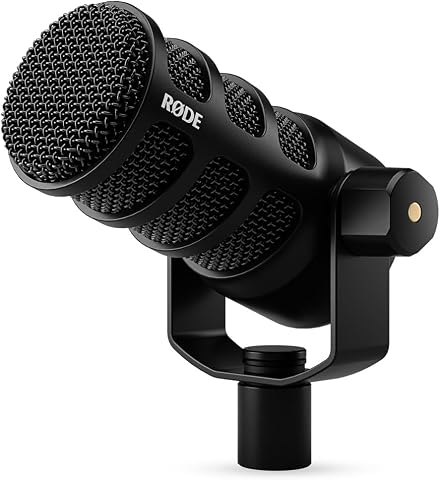
The RØDE PodMic USB is a versatile broadcast microphone with both XLR and USB-C connections, suitable for streaming, podcasts, and recording. It features onboard audio processing with APHEX DSP, noise rejection for speech clarity, and zero-latency monitoring for real-time audio feedback.
Pros:
- Versatile XLR and USB-C connectivity for flexible setup
- Built-in audio processing enhances sound quality
- Effective noise rejection for clear speech
- Zero-latency monitoring for real-time audio
Cons:
- May require additional equipment for professional XLR use
- Bulkier design compared to traditional microphones
Best for: Teams choosing between USB-C and XLR recording workflows.
Not ideal for: Creators whose devices lack the connection they plan to use.
Bottom line: Choose the PodMic USB when its USB-C or XLR connection fits your recording setup.
Ring Light
Lighting is one part of a repeatable video setup for product demonstrations, talking-head clips, or live presentations. The NEEWER 55W 18-inch ring light is named as a dimmable LED kit with a tripod stand, so check that the kit’s form and included pieces suit the place where you record. Its 18-inch size is worth comparing with your available room and the distance between the light, camera, and subject. A common buying mistake is to focus on the light alone and overlook setup space. Measure the area where the tripod will stand, including room for someone to sit or stand in frame. Check the full product listing for the tripod’s dimensions, adjustment range, power details, and included accessories; the supplied name ends with “and P,” so it does not fully identify every kit component. Do not assume that a phone holder, camera mount, or power adapter is included unless the listing confirms it. Verify the contents before planning a complete recording station. Dimming can be useful when you need to adjust brightness for a particular scene, but make sure the controls and power arrangement work for your recording routine. If you film in different locations, consider how often you will move and store the tripod. For a fixed workspace, prioritize a stable position and a clear path for cables. Match the light’s footprint to your room rather than selecting by ring size alone.What to look for:
- Measure the footprint available for an 18-inch light and tripod.
- Confirm the complete kit contents, since the supplied product name is truncated.
- Check power requirements and how the light is controlled and dimmed.
- Verify whether the kit includes the camera or phone mount you need.
- Consider storage and moving the tripod between recording locations.
NEEWER 55W 18-Inch Dimmable LED Ring Light Kit with Tripod Stand and Phone Holde

This 18-inch ring light kit features 240 high-quality LEDs with adjustable brightness and color temperature options of 3200K and 5600K. It includes a Bluetooth remote for wireless control, an adjustable tripod stand, and accessories for smartphones and cameras, making it ideal for content creation, photography, and video recording.
Pros:
- Adjustable brightness and color temperature for versatile lighting
- Wireless Bluetooth remote for convenient control
- Includes adjustable tripod stand and smartphone/camera mounts
- Suitable for various content creation and photography needs
Cons:
- Camera and phone not included
- Requires batteries for remote (not specified)
- Some users may find setup instructions unclear
Best for: Creators who can accommodate a tripod-based lighting station.
Not ideal for: Small workspaces without room for the light and stand.
Bottom line: Confirm the kit contents and footprint before building your recording setup around it.
Webcam
A webcam can give a small business a repeatable camera for calls, recorded updates, and simple promotional videos. The named pick is a 1080p USB-C webcam with a tripod, which combines a stated resolution and connection type with a separate placement option. Before choosing it, check that your computer has a compatible USB-C port or that your planned connection path is supported by the product listing. One common mistake is treating resolution as the only compatibility question. Confirm that the webcam works with the operating system and apps you use, and check whether the tripod can be positioned at the angle and height you need. The product name does not state the tripod’s dimensions or what adjustments it offers, so verify those details. Consider framing as well: allow enough space to place the camera near eye level and keep your background appropriate for the content you produce. Check the mounting options if you need to use a monitor, laptop, or a particular tripod position. For a shared office, consider whether the camera will stay in one place or travel between desks. A portable arrangement may suit a flexible workspace, while a fixed setup may benefit from a reliably repeatable position. Confirm the cable length and included accessories in the listing so the camera can reach your device without awkward routing. Match the webcam to the actual devices and recording apps in your workflow.What to look for:
- Confirm USB-C compatibility with your computer or connection adapter.
- Check operating-system and video-app support in the product listing.
- Verify tripod dimensions, adjustment options, and included mounts.
- Consider camera placement, framing, and the distance to your device.
- Check cable length and accessories for your usual recording location.
1080p USB-C Webcam with Tripod

This USB-C webcam records smooth 1080p video at 30 fps, with autofocus, low-light correction, a wide-angle lens, and dual noise-cancelling microphones. It includes a privacy shutter, a monitor mounting clip, and a portable aluminum tripod, and works with major desktop operating systems and video conferencing and streaming apps.
Pros:
- Smooth 1080p video at 30 fps
- Dual noise-cancelling microphones
- Autofocus and low-light correction
- Includes a privacy shutter and portable tripod
Cons:
- No specific field-of-view measurement is provided
- Microphone pickup range is limited to 10 feet
Best for: Small teams seeking a named 1080p USB-C camera option.
Not ideal for: Setups without a compatible USB-C connection path.
Bottom line: Check device support and tripod placement before selecting this webcam.
Drawing Tablet
A screen drawing tablet can be useful for creating or editing illustrations, annotations, and visual assets as part of a content workflow. The XPPen Artist 22 2nd Generation is named as a 21.5-inch drawing tablet with a screen. That size makes desk space and viewing position central considerations: measure your work surface and check whether the display can sit comfortably alongside your computer and other tools. A common mistake is assuming that a tablet will work with a computer simply because it has a screen. Confirm operating-system support, required connections, and any software compatibility in the product listing. Also verify what cables, stand, pen, and other accessories are included; the supplied name ends with “P,” so it is truncated and does not identify the complete product details. Check the full listing for the exact model and setup requirements before relying on it for a project deadline. Think about who will use the tablet and what kind of work they will create. A larger screen can require a more deliberate desk arrangement, so check viewing angle, working posture, and where the device will be stored when not in use. If several people share the workstation, consider whether the setup can be adjusted to suit them. Match the tablet’s connections and physical footprint to the computer and workspace you already have.What to look for:
- Measure desk space for a 21.5-inch screen and its stand.
- Confirm computer operating-system and connection requirements.
- Verify the exact model and complete product name in the listing.
- Check whether the pen, stand, cables, and required accessories are included.
- Consider viewing angle, working posture, and shared-workstation use.
Drawing Tablet with Screen XPPen Artist 22 2nd Generation, 21.5-inch Pen Display

The XPPen Artist 22 2nd Generation is a 21.5-inch drawing tablet featuring a high-resolution 1920×1080 LCD screen with vibrant color gamut and adjustable stand. It supports tilt-sensitive stylus input with 8,192 pressure levels, making it ideal for digital art, photo editing, and online teaching.
Pros:
- Large 21.5-inch high-resolution display with vibrant colors
- Tilt-sensitive stylus with 8,192 pressure levels for precise control
- Adjustable stand for comfortable drawing angles
- Wide compatibility with major OS and software
Cons:
- USB-C connection requires separate cable purchase
- Some users may find the stand adjustment limited at certain angles
- Price not specified in the data
Best for: Creators who want a screen-based drawing workspace.
Not ideal for: Small desks or computers that do not meet its requirements.
Bottom line: Verify the full model, compatibility, and desk fit before choosing this tablet.
Portable SSD
Reliable file storage matters when a business creates and keeps video, image, and design assets. The listed pick is a WD 20TB Elements desktop external hard drive with USB 3.0, model WDBWLG0200HBK-, according to the supplied product name. The name identifies a desktop external hard drive, so consider whether a desktop form factor suits your workspace and how you intend to connect it to the devices holding your content. The section title says “Portable SSD,” but the named product is described as a desktop external hard drive. Confirm the product category and exact model in the listing before choosing it, especially if you specifically need a portable SSD. Do not assume the drive is battery-powered or designed for travel based on the section label. Check the available ports on your computer, the included cable, and the manufacturer’s compatibility details. Match the storage type to the way you plan to store, transfer, and access files. Another common mistake is treating one external drive as a complete backup plan. Decide which files need a second copy and how your team will keep that copy current. Check how the drive will be placed, powered, and accessed in your office, and confirm that your workflow supports its connection. For active projects, plan who is responsible for organizing and backing up content so files remain findable across the team.What to look for:
- Confirm the full model number and product category in the listing.
- Check whether a desktop external hard drive fits your needs for portability.
- Verify USB 3.0 and cable compatibility with your computer.
- Confirm power and placement requirements for your workspace.
- Plan how project files will be organized and backed up.
WD 20TB Elements Desktop External Hard Drive, USB 3.0 – WDBWLG0200HBK-NESN

The WD Elements Desktop External Hard Drive offers high-capacity 20TB plug-and-play storage for Windows PCs. It features fast data transfers via USB 3.0 and is backed by WD quality inside and out.
Pros:
- High 20TB storage capacity
- Fast USB 3.0 data transfers
- Plug-and-play ready for Windows PCs
- Trusted WD build quality
Cons:
- Requires reformatting for macOS use
Best for: Teams looking for a desktop external hard drive for files.
Not ideal for: Shoppers who specifically require a portable SSD.
Bottom line: Confirm the product type and model before matching it to a storage workflow.
Wireless Lavalier Microphone
A wireless lavalier microphone system can suit recordings where a speaker needs to move or stay hands-free. The named pick is the Gimkuls dual-channel UHF wireless lavalier system. Its product name signals two channels and UHF wireless operation, but it does not specify the full contents or supported recording devices. Check the listing carefully to understand what transmitters, receivers, microphones, and cables are included and how they connect to your camera, phone, or computer. A common mistake is to assume that “wireless” means compatible with every recording device. Confirm the receiver’s output and any adapters required by your intended device. Check how many people you plan to record at once and whether the dual-channel arrangement suits that use. Also confirm the system’s stated operating conditions and setup instructions from the manufacturer; do not infer range or battery life from the product name. Check the signal path from the speaker to the recording device before scheduling a shoot. Consider how the microphones will be attached to clothing and whether the recording environment allows you to manage the equipment comfortably. For interviews or team videos, plan who will monitor audio and check connections before recording. Verify what charging or power accessories are provided, and consider where you will store the small components between shoots. A setup that matches your device and recording format can make on-location content easier to organize.What to look for:
- Confirm receiver compatibility with your camera, phone, or computer.
- Check which microphones, transmitters, receiver, and cables are included.
- Assess whether two channels suit the number of speakers you record.
- Verify power, charging, and setup details in the manufacturer listing.
- Plan microphone attachment and a pre-recording connection check.
Gimkuls Dual-Channel UHF Wireless Lavalier Microphone System
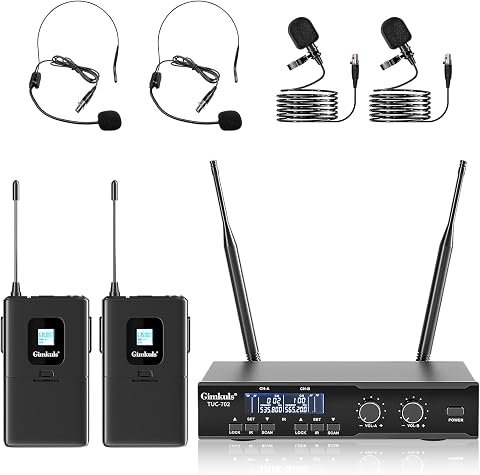
This dual-channel wireless microphone system lets two people speak simultaneously using the included headset or lavalier microphones. It features auto frequency scanning, 100 selectable frequencies per side, independent volume controls, two XLR outputs, and a mixed 6.35 mm output.
Pros:
- Supports two speakers simultaneously
- Includes headset and lavalier microphone options
- Auto scan helps find an available frequency
- Offers separate XLR outputs and a mixed output
Cons:
- AA batteries are not included
- Some connected devices may require an adapter
Best for: Creators recording speakers who need a wireless lavalier setup.
Not ideal for: Workflows whose recording devices do not support the receiver output.
Bottom line: Verify the included components and receiver compatibility before recording with it.
When deciding what to buy first, start with the weakest part of your workflow: audio for spoken content, lighting or a webcam for video, a drawing tablet for visual creation, or storage for growing files. Check device compatibility and workspace fit before adding accessories, and confirm what each product listing actually includes.
Build your setup one useful piece at a time, then check that it works with the tools and process your team already uses. A well-matched checklist can help keep content creation manageable as your business grows.
Fall Picks
fall essentials
As an affiliate, we earn on qualifying purchases.