Color laser printers are vital tools for marketing teams that need vibrant, professional-quality prints for campaigns, presentations, and promotional materials. The best models combine fast output speeds, high-quality color, and reliable connectivity. The HP LaserJet Enterprise M553n stands out as the overall top pick for its enterprise-grade performance, while the Brother MFC-L3720CDW offers great versatility for smaller teams. However, tradeoffs often include higher costs for premium features or complexity in use. Continue reading for a detailed comparison to find the right fit for your team’s specific needs.

Get business pricing on office and shipping supplies
- Business-only prices and quantity discounts
- Tax-exempt purchasing
- Multiple users, one account, clear invoices
Key Takeaways
- The top models balance color quality, speed, and cost-effectiveness, with enterprise options favoring high-volume output and smaller models prioritizing affordability.
- Connectivity options like wireless, Ethernet, and mobile printing significantly influence workflow flexibility for marketing teams.
- All-in-one features such as scanning, copying, and faxing add value but can increase upfront costs and complexity.
- Lower-cost printers often sacrifice speed and color fidelity, making them better suited for occasional use rather than daily marketing output.
- Durability and security features are increasingly important for enterprise environments handling sensitive marketing materials.
| HP LaserJet Enterprise M553n Color Laser Printer (Renewed) |  | Best Overall for High-Volume Office Use | Print Speed: up to 40 pages per minute | First Page Out Time: 6 seconds black, 7 seconds color | Paper Capacity: 650 sheets | VIEW ON AMAZON | See Our Full Breakdown |
| Brother MFC-L3720CDW Wireless Color Laser Printer, Scanner, Copier, Fax, Auto Duplex, 250-Sheet Capacity |  | Best for Versatile Business Use with Mobile Connectivity | Print Speed: 19 ppm | Paper Capacity: 250 sheets | Auto Document Feeder: 50 sheets | VIEW ON AMAZON | See Our Full Breakdown |
| Brother HL-L3280CDW Wireless Color Laser Printer, Duplex, Mobile Printing, Ethernet, Includes 2-Month Refresh Trial |  | Best Compact Model for Small or Home Offices | Print Speed: up to 27 pages per minute | Connectivity: Wireless, Ethernet | Duplex Printing: Automatic | VIEW ON AMAZON | See Our Full Breakdown |
| Brother MFC-L8930CDW Business Color Laser All-in-One Printer with Duplex Print, Scan, Copy, Low-Cost Printing, and Advanced Security Features |  | Best for High-Performance Business Environments | Print Speed: up to 33 ppm | Scan Speed: up to 104 ipm | Auto Document Feeder: 80 pages | VIEW ON AMAZON | See Our Full Breakdown |
| HP Color LaserJet Pro 3201dw Wireless Color Laser Printer |  | Best for Small Teams Needing Vivid Color and Speed | Print Speed: 26 ppm | Color: Yes | Duplex: Auto | VIEW ON AMAZON | See Our Full Breakdown |
| Brother HL-L8430CDW Business Color Laser Printer with Low-Cost Printing and Wireless Networking | 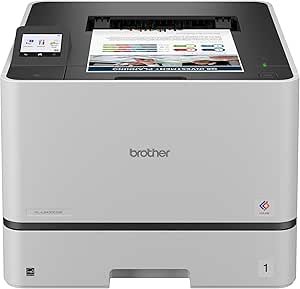 | Best Overall for High-Volume, Secure Color Printing | Print Speed: 33 ppm | Color Output: Yes | Max Paper Capacity: 1,340 sheets | VIEW ON AMAZON | See Our Full Breakdown |
| Brother HL-L3220CDW Color Laser Printer with Wireless Printing and Duplex |  | Best for Small Offices and Home-Based Marketing Teams | Print Speed: 19 PPM | Paper Capacity: 250 sheets | Duplex Printing: Yes | VIEW ON AMAZON | See Our Full Breakdown |
| HP Color LaserJet Pro MFP 3301sdw Wireless All-in-One Color Laser Printer |  | Best for Small to Medium Offices Needing Versatility | Print Speed: up to 26 ppm | Functions: Print, Scan, Copy | Auto Duplex: Yes | VIEW ON AMAZON | See Our Full Breakdown |
| HP Color LaserJet Enterprise M554dn Duplex Printer (7ZU81A) |  | Best for Large, Demanding Office Environments | Print Speed: up to 35 ppm | Input Capacity: 650 sheets | Duplex Printing: Automatic | VIEW ON AMAZON | See Our Full Breakdown |
| color laser printers for marketing team | Print Speed | Connectivity |
|---|---|---|
| HP LaserJet Enterprise M553n C | up to 40 pages per minute | Built-in Ethernet |
| Brother MFC-L3720CDW Wireless | 19 ppm | Wi-Fi, Wi-Fi Direct, USB 2.0 |
| Brother HL-L3280CDW Wireless C | up to 27 pages per minute | Wireless, Ethernet |
| Brother MFC-L8930CDW Business | up to 33 ppm | Dual-band Wi-Fi, Gigabit Ethernet |
| HP Color LaserJet Pro 3201dw W | 26 ppm | Wireless dual-band Wi-Fi |
| Brother HL-L8430CDW Business C | 33 ppm | Wireless, Gigabit Ethernet |
| Brother HL-L3220CDW Color Lase | 19 PPM | — |
| HP Color LaserJet Pro MFP 3301 | up to 26 ppm | Wireless |
| HP Color LaserJet Enterprise M | up to 35 ppm | — |
More Details on Our Top Picks
HP LaserJet Enterprise M553n Color Laser Printer (Renewed)
The HP LaserJet Enterprise M553n stands out for its impressive print speed of up to 40 pages per minute, making it ideal for busy marketing teams that require quick turnaround times. Its large paper capacity of 650 sheets reduces refilling interruptions, while built-in Ethernet ensures seamless network integration. Compared with the Brother MFC-L3720CDW, it offers higher volume capacity and more advanced security features, though it doesn’t include wireless connectivity, limiting flexibility. The refurbished condition might introduce variability, and its design favors office environments over small or home offices. Overall, this model is well-suited for teams managing large print jobs and needing robust security, but it’s less ideal for those seeking wireless or compact options.
Pros:- High print speed of up to 40 ppm accelerates workflow
- Large 650-sheet paper capacity minimizes refills
- Built-in Ethernet for reliable network access
- Enhanced security features protect sensitive data
Cons:- Refurbished condition may lead to inconsistent longevity
- No wireless connectivity limits flexible placement
Best for: Marketing teams in small to mid-sized businesses that prioritize high-volume, secure printing in a dedicated office setting
Not ideal for: Small teams or remote workers who need wireless connectivity or a compact footprint
- Print Speed:up to 40 pages per minute
- First Page Out Time:6 seconds black, 7 seconds color
- Paper Capacity:650 sheets
- Connectivity:Built-in Ethernet
- Display:4-line color display with keypad
- Supported Paper Sizes:Letter, legal, oficio, etc.
Our verdict“This printer is a strong choice for high-demand office environments that need fast, secure, high-volume printing without wireless features.”
Brother MFC-L3720CDW Wireless Color Laser Printer, Scanner, Copier, Fax, Auto Duplex, 250-Sheet Capacity
The Brother MFC-L3720CDW offers a versatile all-in-one solution, combining printing, scanning, copying, and faxing in a compact form. Its print speed of 19 ppm is sufficient for moderate workloads, but compared to the faster HP M553n, it may lag during high-volume tasks. The 3.5-inch touchscreen with shortcuts simplifies operation, and its multiple connectivity options—including Wi-Fi, Wi-Fi Direct, and USB—support flexible workflows. However, its size could be a drawback for very tight spaces, and setup can be challenging for less tech-savvy users. This model suits marketing teams needing multifunction capabilities and mobile integration, but less so for those requiring ultra-fast, high-volume printing.
Pros:- Versatile all-in-one with print, scan, copy, and fax
- Fast, high-quality laser output at 19 ppm
- Intuitive touchscreen with customizable shortcuts
- Multiple wireless and USB connectivity options
Cons:- Bulkier design may not fit small desks
- Higher initial cost compared to basic printers
- Setup complexity for non-technical users
Best for: Small marketing teams seeking an all-in-one device with mobile-friendly features and flexible connectivity
Not ideal for: Very small offices or remote freelancers who don’t need scanning or fax functions
- Print Speed:19 ppm
- Paper Capacity:250 sheets
- Auto Document Feeder:50 sheets
- Connectivity:Wi-Fi, Wi-Fi Direct, USB 2.0
- Touchscreen:3.5-inch color
- Supported Paper Sizes:Letter, legal, executive
Our verdict“This model fits marketing teams looking for multifunctionality and mobile connectivity in a reliable, mid-range printer.”
Brother HL-L3280CDW Wireless Color Laser Printer, Duplex, Mobile Printing, Ethernet, Includes 2-Month Refresh Trial
The Brother HL-L3280CDW is a compact, reliable choice for smaller teams or home offices, offering a respectable 27 ppm print speed. Its automatic duplex printing helps reduce paper costs, and wireless plus Ethernet connectivity support flexible placement. Compared with the larger M553n, it lacks high-volume capacity but compensates with ease of use and energy-efficiency features like Eco Mode. The initial setup may be tricky for some users, especially with the subscription trial required to activate certain features. This printer makes sense for marketing teams with moderate print demands who need space-saving, eco-conscious solutions, but it’s less suited for high-volume environments.
Pros:- Fast print speeds of up to 27 ppm
- Automatic duplex printing reduces paper use
- Wireless and Ethernet for flexible setup
- Eco-friendly features like Eco Mode
Cons:- Requires enrollment in a subscription for full functionality
- Limited initial capacity for high-volume jobs
- Setup can be complex for some users
Best for: Small marketing teams or remote workers needing a space-efficient, wireless printer with duplex printing
Not ideal for: High-volume printing environments or teams requiring extensive paper capacity
- Print Speed:up to 27 pages per minute
- Connectivity:Wireless, Ethernet
- Duplex Printing:Automatic
- Energy Star Certified:Yes
- Warranty:1-year limited
- Supported Paper Sizes:Letter, legal, executive
Our verdict“This printer works best for small teams needing a space-efficient, reliable wireless device for moderate printing needs.”
Brother MFC-L8930CDW Business Color Laser All-in-One Printer with Duplex Print, Scan, Copy, Low-Cost Printing, and Advanced Security Features
The Brother MFC-L8930CDW is tailored for busy marketing teams needing an all-in-one powerhouse, with speeds up to 33 ppm and fast scan rates of 104 ipm. Its 7-inch color touchscreen simplifies complex workflows, and dual-band Wi-Fi plus Gigabit Ethernet ensure reliable network access. Compared to the simpler HL-L3280CDW, this model offers enhanced security with NFC and triple-layer protections, making it ideal for sensitive data. The cost of high-yield toner cartridges is a consideration, and setup may be more involved. This device makes the most sense for larger teams that demand high throughput, security, and multifunctionality in a durable, space-efficient package.
Pros:- Fast print and scan speeds increase productivity
- Advanced security including NFC and triple-layer protection
- High-yield toner options reduce long-term costs
- Compact design for busy offices
Cons:- Setup and configuration can be complex
- High-yield toner cartridges may be costly
- Internet connection required for some features
Best for: High-volume marketing teams requiring secure, fast, all-in-one printing and scanning with advanced security
Not ideal for: Small teams or budgets that can’t accommodate higher toner costs or complex setup
- Print Speed:up to 33 ppm
- Scan Speed:up to 104 ipm
- Auto Document Feeder:80 pages
- Connectivity:Dual-band Wi-Fi, Gigabit Ethernet
- Security Features:Triple Layer Security, NFC
- Toner Cartridges:Standard/High yield options
Our verdict“This model suits larger, security-conscious marketing teams that need high throughput and multifunction capabilities in a compact form.”
HP Color LaserJet Pro 3201dw Wireless Color Laser Printer
The HP Color LaserJet Pro 3201dw is built for small marketing teams that require vibrant color output and quick turnaround, with speeds of 26 ppm. Its auto duplex feature enhances efficiency, and wireless connectivity makes placement flexible. Compared to the more feature-rich HP Enterprise models, this unit offers streamlined functionality suitable for less demanding volumes. It relies on original HP cartridges with specific chips, which can increase ongoing costs, and firmware updates may be needed to maintain optimal performance. This printer makes sense for teams emphasizing quality and speed over extensive paper capacity or advanced security.
Pros:- Vivid color printing with professional quality
- Fast printing speeds of 26 ppm
- Auto duplex saves time and paper
- Wireless dual-band Wi-Fi enables flexible placement
Cons:- Dependent on specific original HP cartridges
- Firmware updates may be necessary for full functionality
- Limited paper input capacity for high-volume jobs
Best for: Small marketing teams or remote offices prioritizing vivid color output and fast, reliable wireless printing
Not ideal for: High-volume or security-sensitive environments where larger capacity or advanced features are needed
- Print Speed:26 ppm
- Color:Yes
- Duplex:Auto
- Input Tray:250 sheets
- Connectivity:Wireless dual-band Wi-Fi
Our verdict“This printer is ideal for small teams that want vibrant color output and speedy wireless printing in a compact, reliable package.”
Brother HL-L8430CDW Business Color Laser Printer with Low-Cost Printing and Wireless Networking
The Brother HL-L8430CDW stands out for its combination of speed, security, and large capacity, making it ideal for busy marketing teams that need vibrant, professional-quality prints with minimal downtime. Compared to the HP Color LaserJet Pro 3301sdw, it offers faster print speeds (33 ppm vs. 26 ppm) and more advanced security options like NFC card reader, though its setup can be more complex and it relies heavily on a stable internet connection for some features. The high-capacity paper tray and support for low-cost, high-yield toner cartridges make it cost-effective over time, especially for high-volume output. However, the initial investment and setup complexity might be barriers for smaller teams or less tech-savvy users.
Pros:- Fast print speeds of 33 ppm with professional-quality color output
- Supports low-cost, high-yield toner cartridges for economical operation
- Expandable paper capacity up to 1,340 sheets for high-volume needs
- Advanced security features including NFC badge authentication
Cons:- Requires internet connection for some mobile printing features
- Initial setup can be complex and time-consuming
Best for: Large marketing teams requiring fast, secure, high-volume color printing with low running costs
Not ideal for: Small teams or startups with limited IT support, due to its complexity and higher upfront cost
- Print Speed:33 ppm
- Color Output:Yes
- Max Paper Capacity:1,340 sheets
- Connectivity:Wireless, Gigabit Ethernet
- Touchscreen:2.7-inch color touchscreen
- Security Features:Triple Layer Security, NFC card reader
Our verdict“This printer suits large, security-conscious marketing teams with high-volume needs and budget flexibility.”
Brother HL-L3220CDW Color Laser Printer with Wireless Printing and Duplex
The Brother HL-L3220CDW is tailored for smaller marketing teams or home offices that need reliable color printing without excessive cost. Its 19 ppm speed is sufficient for moderate workloads, and the wireless, mobile-ready features make it easy to integrate into a flexible work environment. Compared to the Brother HL-L8430CDW, it sacrifices some speed and capacity but compensates with a more straightforward setup and lower initial investment. The automatic duplex printing boosts efficiency, yet the lack of detailed color resolution specs could impact print quality for highly color-sensitive marketing materials. Its 250-sheet tray strikes a balance for smaller-volume needs but limits scalability.
Pros:- Decent print speed of 19 PPM suitable for small workflows
- Wireless and mobile device compatibility for flexibility
- Automatic duplex printing to save time and paper
- Compact design fits smaller spaces
Cons:- No detailed info on color resolution, possibly affecting print quality
- Toner replacements may be costly over time
Best for: Small marketing teams or freelancers needing quality color prints with simple setup and mobile compatibility
Not ideal for: High-volume environments or teams needing advanced security features and large paper capacity
- Print Speed:19 PPM
- Paper Capacity:250 sheets
- Duplex Printing:Yes
- Wireless Connectivity:Yes
- Mobile Device Compatibility:Yes
- Color Resolution:Not specified
Our verdict“Ideal for small teams or individuals seeking reliable, wireless color printing with minimal fuss.”
HP Color LaserJet Pro MFP 3301sdw Wireless All-in-One Color Laser Printer
The HP Color LaserJet Pro 3301sdw combines multiple functions—print, scan, and copy—in a compact package, making it suitable for small to medium marketing teams that require a versatile device. Its 26 ppm speed is efficient for most office workflows, and auto duplex along with a 250-sheet input tray supports sustained productivity. Compared with the Brother HL-L8430CDW, it offers similar color quality but is more focused on multifunctionality and ease of use, albeit with some limitations around cartridge compatibility, as it works best with HP’s chips-enabled cartridges. Firmware restrictions and potential higher costs for HP cartridges could be drawbacks for budget-sensitive teams.
Pros:- Fast color printing at 26 ppm with multifunction capabilities
- Auto duplex and document feeder enhance workflow efficiency
- Reliable performance with original HP toner cartridges
- Compact and easy to set up
Cons:- Designed primarily to work with HP cartridges with chips, limiting third-party options
- Firmware updates might restrict use of third-party or third-party-compatible cartridges
Best for: Small to medium marketing teams needing reliable all-in-one color printing, scanning, and copying
Not ideal for: Large high-volume print environments or teams on strict toner budgets, due to cartridge restrictions
- Print Speed:up to 26 ppm
- Functions:Print, Scan, Copy
- Auto Duplex:Yes
- Input Tray Capacity:250 sheets
- Connectivity:Wireless
- Cartridge Compatibility:HP with chips
Our verdict“A solid choice for small teams seeking a reliable, all-in-one color laser printer with easy integration into existing workflows.”
HP Color LaserJet Enterprise M554dn Duplex Printer (7ZU81A)
The HP Color LaserJet Enterprise M554dn is designed to handle high-volume, demanding office environments, including marketing teams with extensive printing needs. Its impressive 35 ppm speed and large 650-sheet input tray support rapid, continuous output, while the advanced security features and energy-efficient technology provide peace of mind and operational savings. Compared with the Brother HL-L8430CDW, it exceeds in capacity and speed but comes with a much higher price tag, making it less suitable for smaller teams. Its bulk and setup complexity require dedicated space and technical support, yet it offers unmatched throughput and security for enterprise-level needs.
Pros:- High-speed printing of up to 35 ppm for large workloads
- Massive input capacity of 650 sheets minimizes refilling
- Advanced security features for sensitive marketing materials
- Energy-efficient with auto-on/auto-off technology
Cons:- High purchase price and operational costs for small teams
- Bulkier size demands ample office space
- Setup may be complex for non-technical users
Best for: Large marketing departments or agencies with high-volume, security-sensitive printing requirements
Not ideal for: Small offices or teams with limited space or budget constraints, due to size and cost
- Print Speed:up to 35 ppm
- Input Capacity:650 sheets
- Duplex Printing:Automatic
- Security:HP Wolf Enterprise Security
- Energy Efficiency:HP Auto-On/Auto-Off
- Role:High-volume, security-conscious enterprise environment
Our verdict“This printer targets large, security-focused marketing teams needing rapid, high-capacity printing with robust security features.”

How We Picked
These printers were selected based on a combination of performance, usability, build quality, and value. Priority was given to models that deliver vibrant, consistent color output suitable for marketing materials, along with fast printing speeds to accommodate high-volume needs. Ease of use, connectivity options, and security features were also key considerations, especially for teams that require seamless integration into busy workflows. The ranking reflects a balance between these factors, emphasizing models that cater to both small teams and larger marketing departments with enterprise needs.Factors to Consider When Choosing Color Laser Printers For Marketing Teams
Choosing the right color laser printer for marketing teams involves evaluating several key factors that impact daily productivity and print quality. Consider your team’s volume of printing, the importance of color fidelity, and the need for multifunction capabilities. Budget constraints often influence whether a model with advanced features or a more basic, cost-effective option makes sense. Understanding these factors helps ensure you select a printer that fits your specific marketing demands without unnecessary features that add cost.Print Volume and Speed
High-volume marketing campaigns require printers capable of handling large print runs efficiently. Look for models with high pages-per-minute (PPM) speeds and a large paper capacity to avoid frequent refills. If your team prints sporadically, a lower-speed, smaller capacity model might suffice, saving costs. Balancing speed with cost is essential, as faster printers tend to be more expensive but can significantly boost productivity during busy periods.
Color Fidelity and Print Quality
Marketing materials demand vibrant, accurate colors, making color fidelity a top priority. Check specifications for color accuracy and resolution, ideally above 1200 dpi, to ensure sharp images and crisp text. Cheaper models may cut corners here, resulting in dull or inconsistent colors. For professional-looking campaigns, investing in a model with better color management features pays off by delivering more impressive visuals.
Connectivity and Workflow Integration
Wireless, Ethernet, and mobile printing options provide flexibility and streamline workflows, especially in busy marketing environments. Consider whether the printer supports cloud printing or apps for direct device-to-printer communication. A model with multiple connectivity options reduces clutter and allows team members to print directly from smartphones, tablets, or laptops, saving time and simplifying collaboration.
Multifunction Capabilities
All-in-one printers that include scanning, copying, and faxing can consolidate equipment and reduce costs. For marketing teams that handle a variety of document types, these features add convenience. However, multifunction units tend to be more expensive and complex, so assess whether the added features justify the investment based on your team’s actual needs.
Cost of Maintenance and Total Cost of Ownership
Initial purchase price is only part of the equation; consider toner costs, drum replacements, and energy consumption over time. Some models feature high-yield toner options that lower running costs, which is crucial for high-volume printing. Ignoring these ongoing expenses can lead to surprises and budget overruns, especially for larger marketing operations.
Frequently Asked Questions
How do I choose a color laser printer that balances quality and cost?
Focus on printers that offer high-resolution color output (above 1200 dpi) and fast print speeds for high-volume tasks. While premium models deliver better color fidelity and durability, mid-range options often provide a good balance between quality and affordability. Assess your actual print needs to avoid overspending on features you won’t use regularly, but don’t compromise too much on core capabilities that impact the visual quality of your marketing materials.
Are wireless printers reliable for a busy marketing team?
Wireless connectivity adds convenience by enabling direct printing from multiple devices, which boosts workflow efficiency. However, reliability depends on the quality of the wireless network and the printer’s support for modern standards like Wi-Fi 6. For teams with high print volumes, a wired Ethernet connection can provide more stable performance, especially in environments with many connected devices or network traffic. It’s worth testing the network setup before choosing a wireless-only model.
Should I prioritize multifunction features or focus solely on print quality?
This depends on your team’s workflow. If you frequently scan, copy, or fax documents, an all-in-one model offers significant convenience and cost savings. Conversely, if your primary need is high-quality color printing with fast turnarounds, a dedicated printer with superior color management might be better. Evaluate how much multifunctionality impacts your daily tasks and balance it against the potential increase in complexity and cost.
How important are security features in a marketing printer?
Security features such as user authentication, encrypted printing, and secure network access are increasingly relevant, especially if your team handles sensitive or proprietary marketing materials. These features help prevent unauthorized access and data breaches. For larger enterprises, security can justify a higher upfront investment, but smaller teams should weigh the benefits against additional costs and complexity.
What should I consider if my team needs to print on different media types?
If your marketing team prints on various media like glossy, matte, or specialty papers, choose a model with adjustable paper handling and compatible media trays. Check the maximum paper weight supported, as thicker stocks require more robust feed mechanisms. Investing in a versatile printer prevents damage to the machine and ensures consistent print quality across different materials, which is essential for professional marketing collateral.