🔍 Read the full analysis: 10 Best AI Mini PCs For Local AI Computing: 2026 Edition on ThorstenMeyerAI.com
TL;DR
A 2026 comparison of AI mini PCs ranks the GEEKOM A9 Max (Ryzen AI 9 HX 470, 32GB DDR5, 2TB SSD) as the best overall pick, with the GMKtec EVO-X3 standing out for its 128GB of memory and the GMKtec K15 with Oculink offering external graphics expansion. The review stresses that processor branding matters less than memory, cooling, and connectivity for local AI work.
The GEEKOM A9 Max, pairing a Ryzen AI 9 HX 470 with 32GB of DDR5 memory and a 2TB SSD, has been named the best overall AI mini PC in a 2026 comparison published by ThorstenMeyerAI.com. The roundup evaluates ten compact systems for local AI computing, ranking configurations on processor class, memory capacity and type, storage, and expansion options rather than processor branding alone. The GMKtec EVO-X3 takes a specialist position with 128GB of LPDDR5X memory, while the GMKtec K15 with Oculink is singled out for buyers planning external graphics expansion.
The review’s central finding is that memory capacity, not processor tier, often sets the real limit on what a compact PC can do with local AI. “A fast processor may help with general compute, but the system’s available memory can set a harder limit on model size and multitasking,” the review states. Systems with 32GB of RAM are described as better suited to lighter or more constrained AI tasks — a theme also covered in our look at 2026’s most efficient AI mini PCs — while the EVO-X3’s 128GB gives it a distinct role for workloads that need large models or datasets resident in memory.
Storage capacity is treated as a second practical differentiator. The 2TB configurations in the lineup offer more room from the start than 500GB and 512GB options, which the review says matters because local models and datasets consume space quickly alongside operating system updates and project files — a consideration that also applies to premium mini PCs for offices. Among the two Intel Core Ultra 5 125U-based GMKtec K15 configurations, the NucBox K15 lists a 1TB SSD while the K15 with Oculink lists 512GB and adds the external graphics connection — a tradeoff between included storage and expansion headroom.
The review explicitly declines to treat specifications as proven performance. “Product names and specifications alone do not establish benchmark performance, cooling behavior, or software compatibility, so I avoid treating those as proven advantages,” the author writes, urging buyers to verify that their chosen tools support a given chip’s acceleration features.
The 10 picks
- 1
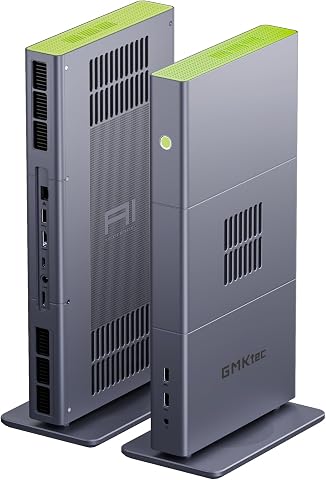 GMKtec EVO-X3 Mini PC with AMD Ryzen AI Max+ 395, 128GB LPDDR5X, and 2TB PCIe…View on Amazon →
 - 2
 GMKtec EVO-X2 AI Mini PC AMD Ryzen AI Max+ 395, Up to 5.1GHz, 16C/32TView on Amazon →
 - 3
 GEEKOM A9 Max Top AI Mini PC, AMD Ryzen AI9 HX470, 32GB DDR5, 2TB SSDView on Amazon →
 - 4
 GEEKOM IT15 Mini PC with Intel Ultra 9 285H, 32GB DDR5, 1TB SSD, Arc 140T GPU…View on Amazon →
 - 5
 MINISFORUM AI X1 Pro-370 Mini PC with AMD Ryzen AI 9 HX370, 32GB DDR5, 1TB SS…View on Amazon →
 - 6
 GEEKOM GT15 Max Business & Professional Mini PC with Intel Core Ultra 9, 32GB…View on Amazon →
 - 7
 GEEKOM IT13 MAX AI Mini PC with Intel Ultra 9 185H, 24GB LPDDR5, 500GB SSDView on Amazon →
 - 8
 Glorlin Mini PC with AMD Ryzen 7 Pro 8845HS, 16GB DDR5 RAM, and 1TB SSDView on Amazon →
 - 9
 GMKtec K15 AI Mini PC Oculink Intel Ultra 5 125U 32GB DDR5 512GB SSD, Desktop…View on Amazon →
 - 10
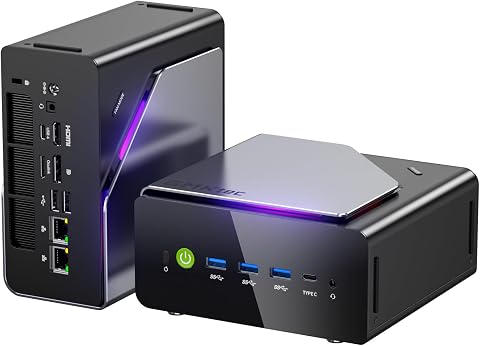 GMKtec K15 Mini PC AI Ultra 5 125U, 12-Core, 32GB DDR5, 1TB PCIe 4.0 SSDView on Amazon →
Why Memory Trumps Processor Branding
The comparison matters because buyers increasingly assume that AI-branded processors — “Ryzen AI” or “Intel Core Ultra” labels — guarantee capable local AI performance. The review argues the opposite: processor names alone do not tell the whole story, and memory capacity, memory type, cooling, and connectivity shape what each compact PC can actually handle. For readers running local language models or AI-assisted development tools, choosing a 32GB system when the workload needs more memory means an upgrade that soldered-memory designs may not allow. The ranking also flags a quieter issue: several premium processors arrive in 32GB configurations, so the highest-tier chip is not automatically the best fit for a given workload.
How the Ten Picks Were Ranked
According to ThorstenMeyerAI.com, the systems were compared on processor class, installed memory, memory type, storage capacity, and expansion options, with priority given to balanced capability and practical fit for AI work. The A9 Max leads as the most balanced listed package; the EVO-X3 earns a specialist position for memory-heavy tasks; less powerful or less fully equipped configurations rank lower for demanding local AI use. The review also considered how ready each listed configuration is out of the box, since a large SSD or high memory capacity can save an immediate upgrade purchase.
“A fast processor may help with general compute, but the system’s available memory can set a harder limit on model size and multitasking.”
— ThorstenMeyerAI.com review
Where Listed Specs Fall Short
No independent benchmark results, cooling measurements, or software compatibility tests accompany the listed specifications, and the review itself cautions against treating vendor performance claims as guarantees. It is not yet clear how each system behaves under sustained local AI workloads, whether soldered memory limits future adaptation on specific models, or which graphics enclosures and cards are confirmed to work over the K15’s Oculink connection. Actual storage needs also depend on what each buyer keeps locally, which the review does not quantify.
What Buyers Should Verify Before Purchasing
Prospective buyers should match memory capacity to the specific models they intend to run — including headroom for the operating system, applications, and context — and check whether memory is replaceable before buying. Those considering the Oculink route should confirm support for their intended graphics enclosure and card, along with connection and power requirements. The review advises waiting for independent workload results where vendor information is the only source, and estimating storage for all models expected to be available at once rather than just the first one tried.
Key Questions
Which AI mini PC is the best overall pick for 2026?
According to the ThorstenMeyerAI.com comparison, the GEEKOM A9 Max is the best overall pick, combining a Ryzen AI 9 HX 470 with 32GB of DDR5 memory and a 2TB SSD in a balanced out-of-box configuration.
Which mini PC has the most memory for local AI?
The GMKtec EVO-X3 leads on memory with 128GB of LPDDR5X, positioning it for workloads that need large models or datasets held in memory.
What is Oculink and why does it matter?
Oculink is a connection that can provide a path to an external graphics setup on systems that support it, such as the GMKtec K15 with Oculink. The review notes it involves extra hardware, desk space, and setup, so it only benefits buyers who plan to add external graphics.
Is 32GB of RAM enough for local AI work?
The review describes 32GB configurations as better suited to lighter or more constrained AI tasks. Whether it is enough depends on the specific model sizes, datasets, and multitasking a buyer expects, including room for the operating system and applications.
Do higher-tier processors guarantee better AI performance?
No. The review states that buyers should match memory capacity to their workload rather than assume the highest-tier processor is always the best fit, and that a newer processor name may not help if chosen tools do not support its acceleration features.
Source: ThorstenMeyerAI.com